
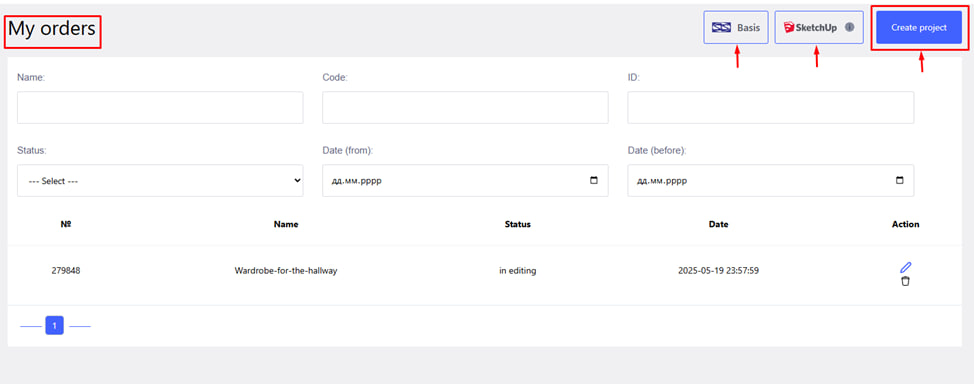
You can create an order in three ways:
- Create a new order directly in your account.
- Import a project from “ Basis ”.
- Import a project from SketchUp .
To create an order, click the blue " Create project " button in the upper right corner.
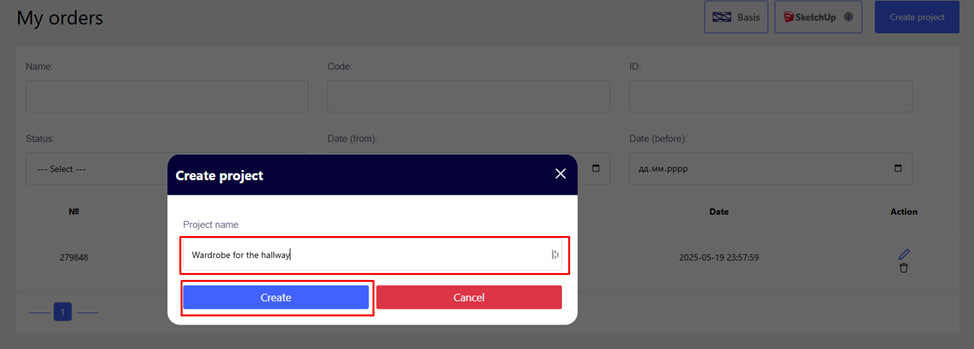
- Enter the name of the project (for example, "Cabinet for the hall").
- Click Create .
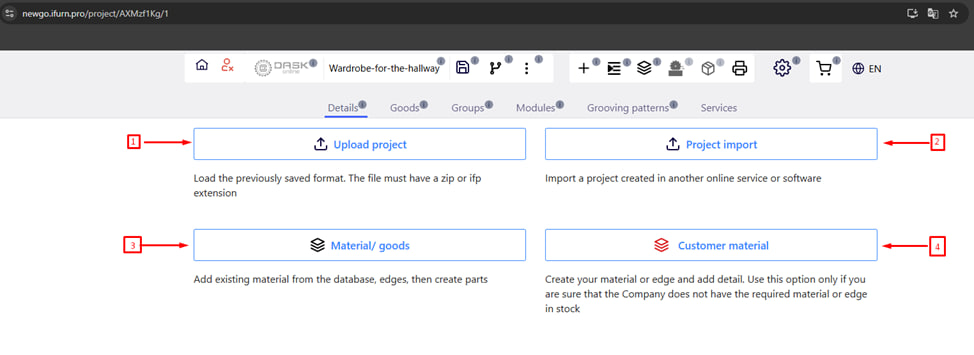
On this page, you have 4 main options for creating an order:
- Upload project - upload a project previously created directly in iFurnPro . Note: The extension must be in .zip or .ifp format.
- Project import - import of a project created in another online platform or design program. For example: Giblab , Basis, etc. WARNING! In addition to ViYar . Note : The extension must be in .project, .csv format. You can also import from Excel using the import file template.
- Material/goods - adding available materials , edges and goods (fittings) from the supplier's database. Recommended method for a standard order.
- Customer material - manual creation of materials or edges, if the required items are not available in the company's database. WARNING! Use this option only if you are sure that the supplier does not have the necessary material .
These four options allow you to choose the most convenient way of creating an order, according to your needs and initial data. It is recommended to use Material /goods whenever possible to avoid unnecessary clarifications by the supplier.