

The " Products " tab allows you to edit parametric furniture units that were added through the Admin Panel by the designer of this company - for example, bedside tables, cabinets, shelves, etc.
This section is used for:
- Changes in product dimensions;
- Changes in materials and edges;
- View or edit the entire product design.
Note:
-
When creating a product in the Admin panel, geometry restrictions (X / Y / Z) are set - you will not be able to enter values that go beyond the permissible limits;
- All products in the system are parametric - that is, the detailing is generated automatically based on the parameters you specify ;
-
You cannot change product details, you can only edit the product they belong to. If you delete a product, all details will be deleted .
Adding a product :
- Enter the required dimensions of the finished product ;
- Select the material and edge that you loaded into the project;
- For more information about adding a product , see section 6 of the article “ Adding ”.
Product editing:
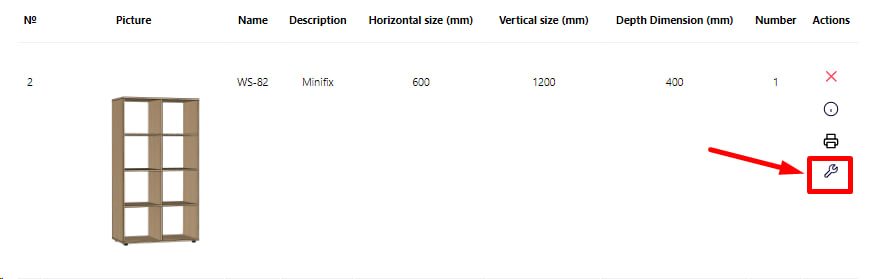
- To edit a product, click the appropriate button;
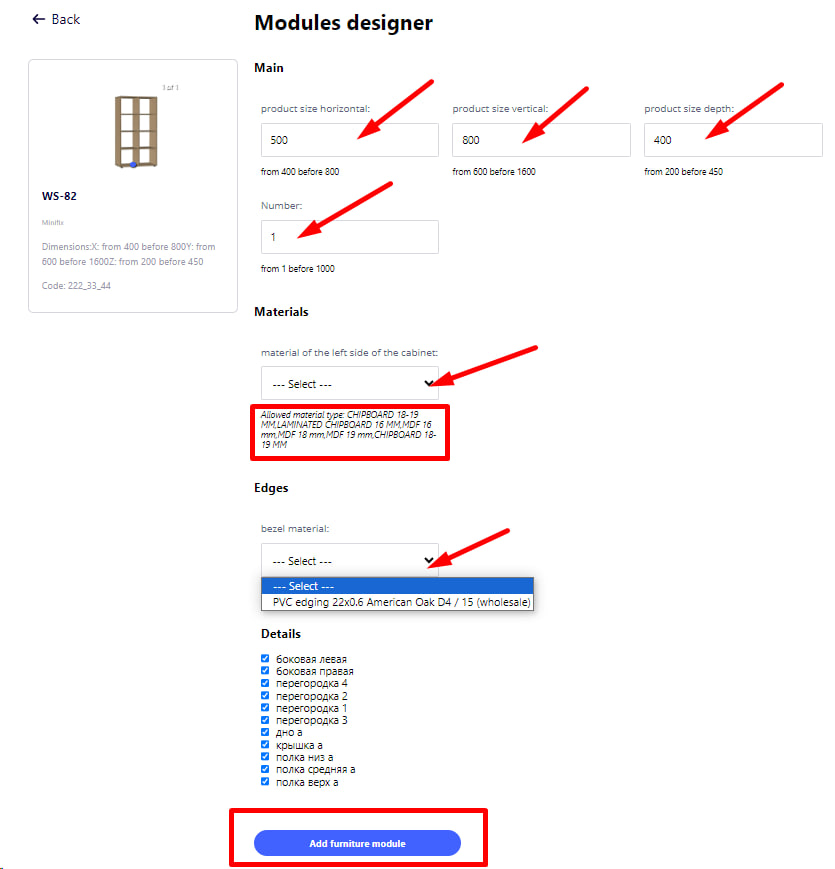
- After that, the product editing page will open, where all its parameters are available.
You will be able to:
- Change the material of the body or facade;
- Change the edge;
- Adjust the geometric dimensions of the product (height, width, depth).
After editing:
- The system will automatically update the product composition (parts, materials, edges);
- The data will be updated in the detailing, calculation , and other sections of the project.